


Digital Photography 101
Capture the Moment, Frame Your Future


 8 Hours average completion time
 0.8 CEUs
 13 Lessons
 24 Exams & Assignments
 347 Discussions
 13 Videos
 13 Reference Files
 139 Articles
 Mobile Friendly
 Last Updated June 2026

Unleashing the Power of Your Digital Camera
In the digital age, photography has transcended from being a specialized craft reserved for professionals to a universally accessible art form. With the advent of digital cameras, virtually anyone can capture the world through their lens. However, owning a sophisticated camera doesn't automatically translate into stunning images. In fact, it's easy to feel overwhelmed by the sheer number of settings, functions, and tools your device offers. If you've ever found yourself fumbling with your new digital camera, unsure where to begin, you're not alone. Fortunately, this journey doesn't have to be frustrating-it's an exciting adventure, and we're here to guide you through it.
The Evolution of Digital Cameras: From Simple to Sophisticated
Once, the art of photography was confined to those with access to costly, complex equipment and years of technical training. But today, digital cameras have revolutionized the landscape. Whether you're holding a point-and-shoot or a high-end DSLR (Digital Single-Lens Reflex) camera, you now possess an incredible tool capable of capturing life's moments in exquisite detail. Yet with this accessibility comes complexity. The manual alone might feel like reading a technical encyclopedia, full of jargon about megapixels, ISO settings, and lens apertures. This is where our journey together begins, as we strip away the mystique and dive into what really makes your camera tick.
Understanding Your Camera: A Gateway to Creativity
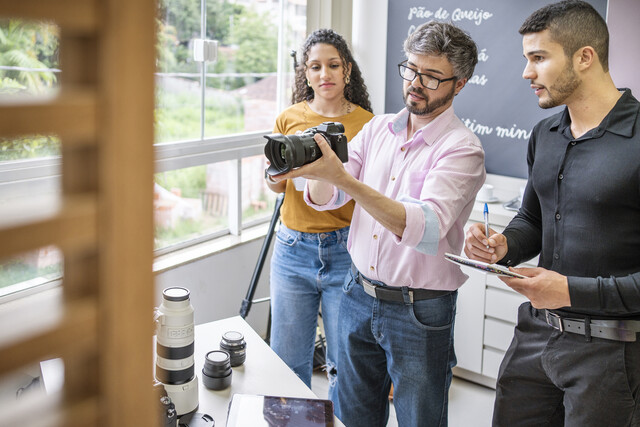
The first step in mastering your digital camera is understanding its core functions. Cameras, like people, come in all shapes and sizes, each with their own strengths and quirks. From the sleek simplicity of a compact model to the robust versatility of a DSLR, knowing your device is the key to unlocking its full potential. In our course, we'll break down the mechanics of how your camera works. You'll learn why sensors matter more than megapixels, and how pixel count impacts image quality. We'll show you how to use your camera's settings to tailor each shot to the situation, from capturing the warmth of golden-hour sunsets to the crystal clarity of a dew-covered leaf in the morning light.
Lenses: Your Camera's Eyes to the World
Once you've familiarized yourself with the basics of your camera, it's time to explore the world through its lenses-literally. Lenses are like the eyes of your camera, each type offering a different perspective on the world around you. Whether you're looking to capture a sweeping landscape or zoom in on the intricate detail of a flower's petal, choosing the right lens can make or break your shot. Our deep dive into the world of lenses will demystify this crucial element of photography. Wide-angle lenses, telephoto zooms, prime lenses-they all have unique purposes, and knowing when to use each one will transform your photos from mundane to magnificent.
Mastering the Tools of the Trade
A camera is more than just a body and a lens. To take your photography to the next level, you'll need to master a few key tools. Flashes, filters, and exposure meters may sound like the stuff of a professional studio, but they're just as relevant to the casual hobbyist. For example, a flash is essential not only for low-light situations but also for adding drama or filling in shadows on a bright day. Filters, meanwhile, allow you to control the mood of your shot, whether you want to bring out the vibrant colors of a sunset or soften the light for a dreamy portrait. Our course will walk you through how and when to use these tools, giving you the confidence to experiment with different techniques.
The Art of Composition: Framing Your World
Have you ever looked at a photo and felt like something was missing? Maybe the subject wasn't centered properly, or the background was too distracting. This is where composition comes in. Photography isn't just about capturing a moment-it's about how you frame that moment, how you tell a story through your shot. Composition is an art in itself, and we'll show you how to master it. You'll learn timeless rules like the Rule of Thirds, where placing your subject off-center adds depth and interest, and the S-Curve, which guides the viewer's eye through the photograph in a natural, flowing way. By the end of our lessons, you won't just be snapping pictures-you'll be creating compelling visual stories.
Telling Stories Through Photography
A picture, as they say, is worth a thousand words. But in photography, the most powerful images are those that communicate emotions, thoughts, and narratives without needing a single word. Photography is your voice, a way to share how you see the world. In our course, you'll discover how to convey emotion and atmosphere through your photos. Whether it's the pure joy in a child's smile, the serene beauty of a landscape at dawn, or the quiet intimacy of a candid portrait, you'll learn how to make your images resonate with viewers on a deeper level. With practice, your photos will not only document moments but also evoke powerful reactions from those who see them.
Exploring Different Styles: Finding Your Photographic Voice
Just as painters have their styles, so do photographers. Some might be drawn to the rich textures of black-and-white photography, while others revel in the vibrant colors of nature. Our course encourages you to explore different styles and techniques, from the dramatic to the minimalist, from capturing the vibrant energy of urban life to the calm stillness of a forest. As you experiment with these styles, you'll begin to find your own voice as a photographer-a voice that is as unique as your perspective.
Capturing Life's Most Important Moments
As you grow more confident in your photography skills, you'll want to capture the moments that matter most in life-family gatherings, weddings, graduations, or even the simple joy of a sunny afternoon in the park. We'll show you how to approach these milestones with creativity and flair, ensuring that every shot not only preserves the memory but enhances it. Special techniques like capturing the perfect reflection on a lake or the drama of a stormy sky will add depth and emotion to your photos, making them cherished memories for years to come.
Beyond the Shot: Editing and Preservation
The photography process doesn't end when you press the shutter button. Post-processing-whether it's through simple cropping or more advanced editing techniques-can transform a good photo into a great one. Our course will introduce you to basic photo-editing software, teaching you how to enhance the colors, adjust the contrast, or remove unwanted elements from your photos. And once your masterpiece is complete, we'll show you the best practices for storing and organizing your digital library, ensuring that your treasured memories are preserved safely and neatly for future generations.
Your Photographic Journey Begins Here
Photography is more than just a hobby-it's a journey of discovery, both of the world around you and of your own creative potential. Whether you're a complete beginner or someone looking to refine their skills, our digital photography course is designed to guide you through every step of this journey. You'll not only learn how to operate a camera but also how to think, see, and create like a photographer.

- Identify optimal lens for each scene
- Utilize metering modes for perfect exposure
- Optimize digital workflow and organization
- Craft unique photographic style
- Balance natural and artificial lighting
- Apply creative composition techniques
- Capture compelling visual stories
- Master manual camera settings
- Edit photos with professional software
- Innovatively arrange still life photography
- Utilize filters for artistic effects



 Financial Management
  Entrepreneurship
  Science
  Art & Design
  Management
  Self-Improvement
Home Decorating
Paranormal Studies
Self-Improvement
Home Decorating
Paranormal Studies  Financial Skills


-

Law Office Management 101
-

Public Relations 101
-

Disaster Risk Reduction: Preparing for Emergencies
-

Talent Management for Business
-

Advocacy for Elderly Patients
-

Nutrition 201: A Closer Look
-

Understanding Cryptocurrencies
-

How to Care for House Pets
-

Ultimate Excel Training Bundle
-

Managing Difficult Employees
-

GED Test Preparation
-

Vocabulary Level 2
-

OneNote for Windows
-

Ultimate Parenting Course Bundle
-
Understanding Learning Styles
-
Christianity 101: An Introduction
-

Goal Setting for Business
-

Disaster Preparedness 101
-

Write to Win: Secrets of Persuasive Writing
-

Computer Literacy Level 3 - Living and Working Online